Marigold Bridge AI: Día de Muertos Video from One Photo
One photo. Their first walk across the marigold bridge.
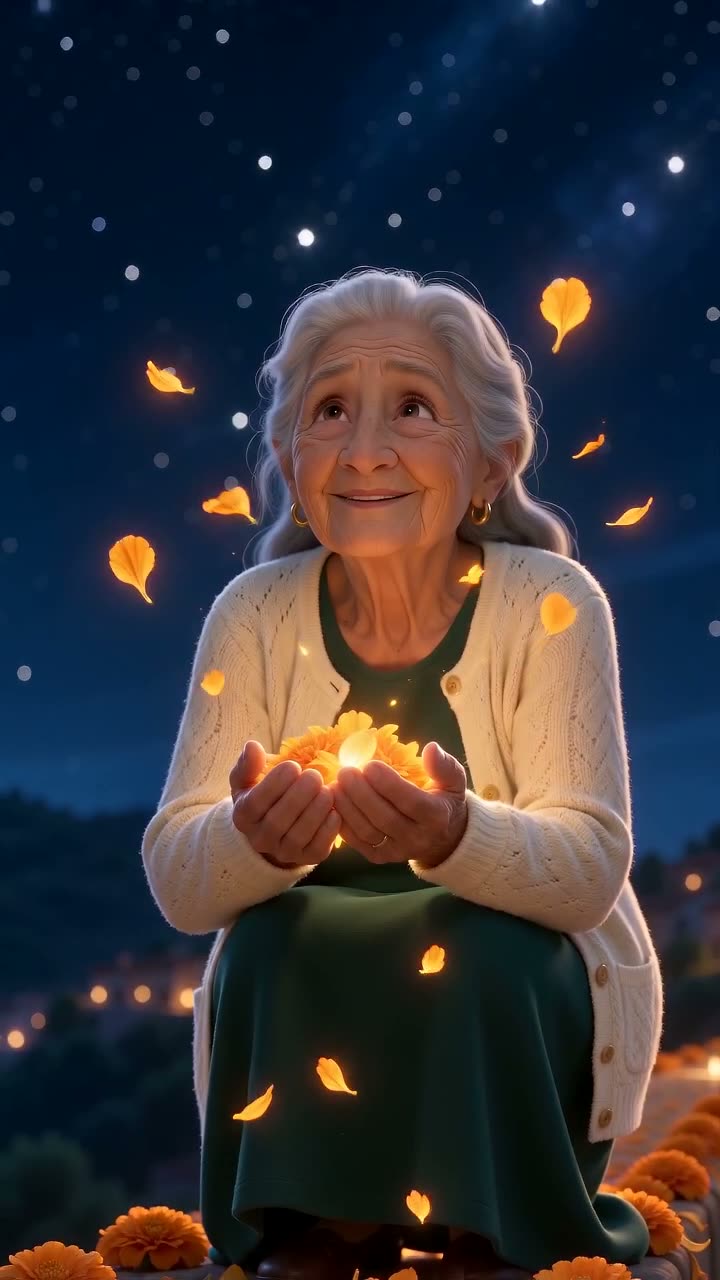
Upload one photo of a loved one and get the 10-second marigold bridge video: as a warm 3D character they take their first steps on a glowing cempasúchil petal bridge, crouch and gather the petals. 720p 9:16, soft guitar, $9.99, no account. No preview render; the sample shows what you get.
Published Oct 23, 2026 · Updated Oct 23, 2026
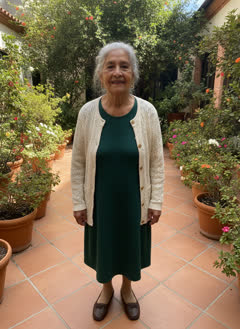 1 photo in→ this video out
- No sign-up
- Ready in ~5 min
- Your photo
Your photos guide a new AI render. Details and likeness can differ from the sample.
Choose photos that suit this scene:
- ✓ One adult, face clearly visible and well lit
- ✓ Full body or waist-up keeps their clothes; an old or black-and-white print works if the face is sharp
- ✗ Group photos, tiny faces, glare on a framed photo, heavy filters
- ✗ Children, celebrities, or anyone whose family has not agreed
What is the Marigold Bridge trend?
A Día de Muertos 2026 trend on TikTok and CapCut, posted in Spanish with the caption "No lo dejen solito, es su primera vez cruzando el puente de cempasúchil" (don’t leave him alone, it’s his first time crossing the marigold bridge). AI video sites added photo-to-video versions in October 2026.
What happens in the video, second by second?
Our own scene, made fresh from your photo:
- about 0–4sLow camera at their feet: first slow steps onto a bridge of glowing orange marigold petals under a starry sky; each step lights the petals
- about 4–5sThey look down at the petals in wonder and crouch down
- about 5–7sBoth hands run through the petals and scoop up a glowing handful
- about 7–10sPetals held to the chest, a soft smile; a few petals drift up into the night sky
How do I make the Marigold Bridge AI video?
- 1Add one photo: JPG, PNG or WEBP, up to 10 MB, face clearly visible.
- 2Leave your email and pay $9.99 once. No account, no app.
- 3Get a 10-second 720p 9:16 MP4 by email in about 5 minutes. Add the trend sound in TikTok or Reels.
Which sites make the marigold bridge AI video?
As of October 23, 2026, three sites turn one photo into the marigold bridge video. MakeViral: 10 s at 1080p with sound, 56 credits per video, smallest credit pack $9.99. Viberot: 12 s, no sound, 176 credits at 720p, credit packs from $9.90, and videos made on a free account appear in its public gallery. MemeVibe: 10 s at 720p with our own soft guitar track, $9.99 for one video, no account, delivered by private link. For 1080p, MakeViral; for one video with no account and no public gallery, MemeVibe.
| MakeViral | Viberot | MemeVibe | |
|---|---|---|---|
| Video | 10 s, 1080p, 9:16 | 12 s, 720p (Standard), 9:16 or 16:9 | 10 s, 720×1280, 9:16 |
| Sound | Soft music | None (add your own) | Our own soft guitar track |
| Price for one video | 56 credits; smallest pack $9.99 for 100 credits | 176 credits at 720p; packs from $9.90 for 600 credits | $9.99, pay once as a guest |
| Who sees it | Not stated on the template page | Free-account videos appear in a public gallery | Only you: private pickup link by email |
| If a render fails | Credits come back | Credits come back automatically | 1 retry, then a refund for that video |
Checked Oct 23, 2026 on each site’s own pages: MakeViral marigold bridge template, Viberot marigold bridge page. Prices in USD before tax; they can change.
CapCut template or memevibe: which should I use?
Use a CapCut template if you do not mind installing the app and editing it yourself. Use MemeVibe to receive a finished video from your photos without installing an editor.
| CapCut template | memevibe | |
|---|---|---|
| App needed | Yes, CapCut | No, works in the browser |
| What you do | Edit the template yourself | Add your photos, pay, download the MP4 |
| Sound | Usually the trend sound | Our own soft guitar track, 10 s; add the trend sound when you post if you like |
| Video | The template’s own footage | A new AI video made from your photo |
How much does it cost?
Check the sample for this scene before paying. Pay $9.99 once for one video on MemeVibe. You do not need an account or subscription. A failed render includes one retry; if that attempt also fails, request a refund for that video at hello@memevibe.ai.
Can I use a photo of someone who has passed away?
Yes, that is what most people make it for. Use an adult (18+) and talk to the family first. An old printed or black-and-white photo works if the face is sharp and there is no glare; the video comes out in color.
What does "no lo dejen solito" mean?
Spanish for "don’t leave him alone" (no la dejen solita for a woman). The full caption says it is their first time crossing the marigold bridge: people post it for someone’s first Día de Muertos after they passed.
What is the marigold (cempasúchil) bridge?
In Día de Muertos tradition, orange cempasúchil (marigold) petals mark the path that guides the souls of the dead home to the family ofrenda on November 1–2. The trend shows that path as a glowing bridge.
Is it a scene from a movie?
No. The look is our own warm 3D animation: a petal bridge, a starry sky and a lantern-lit town. No film characters, no skulls or face paint; only the person from your photo appears.
Will it look like them?
They become a 3D animated character: face shape, hair, age and clothes follow the photo, but it is an animated likeness, not a photograph. A finished clip with an imperfect likeness is not a failed render and is not refunded or remade.
Can I add the ofrenda photo at the end, like the TikTok posts?
Yes, in TikTok or CapCut: add your clip, then add the real photo (or a shot of your ofrenda) as a second clip after it. Our video ends on the bridge, with their smile.
Can I make it for a pet?
Not on this page: it is made for one adult person. For a dog or cat, use Marigold Bridge Pet AI.
What if the render fails?
Open your order page to retry a failed render once. If that attempt fails as well, ask hello@memevibe.ai to refund that video. Uploads that violate our rules, including photos of children, celebrities or politicians, are not refundable.
Do I need the original video, an app or a CapCut template?
Use the photo slots on this page: JPG, PNG or WebP, up to 10 MB each. MemeVibe supplies the scene instructions. You do not need to install an editor or supply a video or song.
Can I use a celebrity photo?
Choose an adult you have permission to depict, or a pet where the template allows one. MemeVibe creates the scene from those photos; public figures and copyrighted characters are excluded.
Does it have the original song?
MemeVibe supplies its own quiet background track, timed to the clip. The song associated with the trend is not included; select music in TikTok or Reels when you publish.
Who can be in the photo?
Adults only (18+). Use your own photo or one you have permission to use, and anyone in it must be 18 or older. No celebrities, politicians or copyrighted characters.
Do I have to make all 3 videos at once?
No. Your first video is made from your photo right after payment. The other 2 are credits: use them within 30 days of payment on any template, Santa included, from your order page, with new photos. To get back without an account, open My videos & credits and enter your checkout email; we email you a new private link. Finished videos are still kept for 3 days each. A 3-Video Pack is refunded in full only within 7 days of payment and only if none of its videos has been made; used, older or expired packs aren't refunded (see our refund policy).
What memevibe does not do
- ✗ No celebrity, politician or character photos.
- ✗ We do not use, host or show the original video or song.
- ✗ No official logos. memevibe is a fan-made tool, not affiliated with the creators.
- ✓ By uploading, you confirm you have the right to use the photo.
Also called
- marigold bridge video from photo
- no lo dejen solito AI
- puente de cempasúchil AI
- Día de Muertos AI memorial video
- first Día de Muertos AI